Free flex uploader is coming along pretty great
Hello All,
I’m developing an Uploader component, for free use in your website or blog.
I’m using Adobe flex builder 3 for it, so the final result will be an swf you can simply embed in your real life website.
Well, this is not a release note, just an update.
I have completely changed the way you will configure the uploader. It used to be a couple fo JavaScript predefined function you should have used. I changed it to an XML config file, it has all of the parameters I could think of.
I’m pasting the xml straight from the development environment, its really important to me to hear what you have to say, I want it to be as user friendly as possible.
Please, if you think I should add another param or whatever, please drop me an email or send a contact through the contact page.
Here’s the xml
<pre style="border-style: none; margin: 0em; padding: 0px; overflow: visible; font-size: 8pt; width: 100%; color: black; line-height: 12pt; font-family: consolas,'Courier New',courier,monospace; background-color: #f4f4f4;"><span style="color: #606060;"> 2:</span> <span style="color: #0000ff;"><</span><span style="color: #800000;">uploaderConfig</span><span style="color: #0000ff;">></span></pre>
<pre style="border-style: none; margin: 0em; padding: 0px; overflow: visible; font-size: 8pt; width: 100%; color: black; line-height: 12pt; font-family: consolas,'Courier New',courier,monospace; background-color: white;"><span style="color: #606060;"> 3:</span> <span style="color: #008000;"><!--</span></pre>
<pre style="border-style: none; margin: 0em; padding: 0px; overflow: visible; font-size: 8pt; width: 100%; color: black; line-height: 12pt; font-family: consolas,'Courier New',courier,monospace; background-color: #f4f4f4;"><span style="color: #606060;"> 4:</span> <span style="color: #008000;"> Should be: http://www.your_domain.com/your_script.aspx/php/whatever <img src="http://www.kensodev.com/wp-includes/images/smilies/simple-smile.png" alt=":-)" class="wp-smiley" style="height: 1em; max-height: 1em;" /> </span></pre>
<pre style="border-style: none; margin: 0em; padding: 0px; overflow: visible; font-size: 8pt; width: 100%; color: black; line-height: 12pt; font-family: consolas,'Courier New',courier,monospace; background-color: white;"><span style="color: #606060;"> 5:</span> <span style="color: #008000;"> --></span></pre>
<pre style="border-style: none; margin: 0em; padding: 0px; overflow: visible; font-size: 8pt; width: 100%; color: black; line-height: 12pt; font-family: consolas,'Courier New',courier,monospace; background-color: #f4f4f4;"><span style="color: #606060;"> 6:</span> <span style="color: #0000ff;"><</span><span style="color: #800000;">uploadScriptUrl</span><span style="color: #0000ff;">></</span><span style="color: #800000;">uploadScriptUrl</span><span style="color: #0000ff;">></span></pre>
<pre style="border-style: none; margin: 0em; padding: 0px; overflow: visible; font-size: 8pt; width: 100%; color: black; line-height: 12pt; font-family: consolas,'Courier New',courier,monospace; background-color: white;"><span style="color: #606060;"> 7:</span> <span style="color: #008000;"><!--</span></pre>
<pre style="border-style: none; margin: 0em; padding: 0px; overflow: visible; font-size: 8pt; width: 100%; color: black; line-height: 12pt; font-family: consolas,'Courier New',courier,monospace; background-color: #f4f4f4;"><span style="color: #606060;"> 8:</span> <span style="color: #008000;"> Should be javascript funcion that gets a single param like so: progressEvent(progress)</span></pre>
<pre style="border-style: none; margin: 0em; padding: 0px; overflow: visible; font-size: 8pt; width: 100%; color: black; line-height: 12pt; font-family: consolas,'Courier New',courier,monospace; background-color: white;"><span style="color: #606060;"> 9:</span> <span style="color: #008000;"> You can display this to the user, or do other things you want.</span></pre>
<pre style="border-style: none; margin: 0em; padding: 0px; overflow: visible; font-size: 8pt; width: 100%; color: black; line-height: 12pt; font-family: consolas,'Courier New',courier,monospace; background-color: #f4f4f4;"><span style="color: #606060;"> 10:</span> <span style="color: #008000;"> --></span></pre>
<pre style="border-style: none; margin: 0em; padding: 0px; overflow: visible; font-size: 8pt; width: 100%; color: black; line-height: 12pt; font-family: consolas,'Courier New',courier,monospace; background-color: white;"><span style="color: #606060;"> 11:</span> <span style="color: #0000ff;"><</span><span style="color: #800000;">progressEventListner</span><span style="color: #0000ff;">></</span><span style="color: #800000;">progressEventListner</span><span style="color: #0000ff;">></span></pre>
<pre style="border-style: none; margin: 0em; padding: 0px; overflow: visible; font-size: 8pt; width: 100%; color: black; line-height: 12pt; font-family: consolas,'Courier New',courier,monospace; background-color: #f4f4f4;"><span style="color: #606060;"> 12:</span> <span style="color: #008000;"><!--</span></pre>
<pre style="border-style: none; margin: 0em; padding: 0px; overflow: visible; font-size: 8pt; width: 100%; color: black; line-height: 12pt; font-family: consolas,'Courier New',courier,monospace; background-color: white;"><span style="color: #606060;"> 13:</span> <span style="color: #008000;"> Same as before, javascript function that gets a single param > Error Message</span></pre>
<pre style="border-style: none; margin: 0em; padding: 0px; overflow: visible; font-size: 8pt; width: 100%; color: black; line-height: 12pt; font-family: consolas,'Courier New',courier,monospace; background-color: #f4f4f4;"><span style="color: #606060;"> 14:</span> <span style="color: #008000;"> errorListner(errorMessage)</span></pre>
<pre style="border-style: none; margin: 0em; padding: 0px; overflow: visible; font-size: 8pt; width: 100%; color: black; line-height: 12pt; font-family: consolas,'Courier New',courier,monospace; background-color: white;"><span style="color: #606060;"> 15:</span> <span style="color: #008000;"> --></span></pre>
<pre style="border-style: none; margin: 0em; padding: 0px; overflow: visible; font-size: 8pt; width: 100%; color: black; line-height: 12pt; font-family: consolas,'Courier New',courier,monospace; background-color: #f4f4f4;"><span style="color: #606060;"> 16:</span> <span style="color: #0000ff;"><</span><span style="color: #800000;">errorListner</span><span style="color: #0000ff;">></</span><span style="color: #800000;">errorListner</span><span style="color: #0000ff;">></span></pre>
<pre style="border-style: none; margin: 0em; padding: 0px; overflow: visible; font-size: 8pt; width: 100%; color: black; line-height: 12pt; font-family: consolas,'Courier New',courier,monospace; background-color: white;"><span style="color: #606060;"> 17:</span> <span style="color: #008000;"><!--</span></pre>
<pre style="border-style: none; margin: 0em; padding: 0px; overflow: visible; font-size: 8pt; width: 100%; color: black; line-height: 12pt; font-family: consolas,'Courier New',courier,monospace; background-color: #f4f4f4;"><span style="color: #606060;"> 18:</span> <span style="color: #008000;"> What do you want your users to upload?</span></pre>
<pre style="border-style: none; margin: 0em; padding: 0px; overflow: visible; font-size: 8pt; width: 100%; color: black; line-height: 12pt; font-family: consolas,'Courier New',courier,monospace; background-color: white;"><span style="color: #606060;"> 19:</span> <span style="color: #008000;"> jpg;mpg;wmv;flv</span></pre>
<pre style="border-style: none; margin: 0em; padding: 0px; overflow: visible; font-size: 8pt; width: 100%; color: black; line-height: 12pt; font-family: consolas,'Courier New',courier,monospace; background-color: #f4f4f4;"><span style="color: #606060;"> 20:</span> <span style="color: #008000;"> all other file types you want type here will be disregarded and an error will be raised.</span></pre>
<pre style="border-style: none; margin: 0em; padding: 0px; overflow: visible; font-size: 8pt; width: 100%; color: black; line-height: 12pt; font-family: consolas,'Courier New',courier,monospace; background-color: white;"><span style="color: #606060;"> 21:</span> <span style="color: #008000;"> --></span></pre>
<pre style="border-style: none; margin: 0em; padding: 0px; overflow: visible; font-size: 8pt; width: 100%; color: black; line-height: 12pt; font-family: consolas,'Courier New',courier,monospace; background-color: #f4f4f4;"><span style="color: #606060;"> 22:</span> <span style="color: #0000ff;"><</span><span style="color: #800000;">fileTypeAllowed</span><span style="color: #0000ff;">></</span><span style="color: #800000;">fileTypeAllowed</span><span style="color: #0000ff;">></span></pre>
<pre style="border-style: none; margin: 0em; padding: 0px; overflow: visible; font-size: 8pt; width: 100%; color: black; line-height: 12pt; font-family: consolas,'Courier New',courier,monospace; background-color: white;"><span style="color: #606060;"> 23:</span> <span style="color: #008000;"><!--</span></pre>
<pre style="border-style: none; margin: 0em; padding: 0px; overflow: visible; font-size: 8pt; width: 100%; color: black; line-height: 12pt; font-family: consolas,'Courier New',courier,monospace; background-color: #f4f4f4;"><span style="color: #606060;"> 24:</span> <span style="color: #008000;"> This is when i make your life easier.</span></pre>
<pre style="border-style: none; margin: 0em; padding: 0px; overflow: visible; font-size: 8pt; width: 100%; color: black; line-height: 12pt; font-family: consolas,'Courier New',courier,monospace; background-color: white;"><span style="color: #606060;"> 25:</span> <span style="color: #008000;"> You can pass me the file size in KB, the flex handles the translation to bytes <img src="http://www.kensodev.com/wp-includes/images/smilies/simple-smile.png" alt=":-)" class="wp-smiley" style="height: 1em; max-height: 1em;" /></span></pre>
<pre style="border-style: none; margin: 0em; padding: 0px; overflow: visible; font-size: 8pt; width: 100%; color: black; line-height: 12pt; font-family: consolas,'Courier New',courier,monospace; background-color: #f4f4f4;"><span style="color: #606060;"> 26:</span> <span style="color: #008000;"> How?... like so:</span></pre>
<pre style="border-style: none; margin: 0em; padding: 0px; overflow: visible; font-size: 8pt; width: 100%; color: black; line-height: 12pt; font-family: consolas,'Courier New',courier,monospace; background-color: white;"><span style="color: #606060;"> 27:</span> <span style="color: #008000;"> KB:250</span></pre>
<pre style="border-style: none; margin: 0em; padding: 0px; overflow: visible; font-size: 8pt; width: 100%; color: black; line-height: 12pt; font-family: consolas,'Courier New',courier,monospace; background-color: #f4f4f4;"><span style="color: #606060;"> 28:</span> <span style="color: #008000;"> Please do not use a double.decimal the, thoug you won't get en Error the flex simply will disregard this</span></pre>
<pre style="border-style: none; margin: 0em; padding: 0px; overflow: visible; font-size: 8pt; width: 100%; color: black; line-height: 12pt; font-family: consolas,'Courier New',courier,monospace; background-color: white;"><span style="color: #606060;"> 29:</span> <span style="color: #008000;"> --></span></pre>
<pre style="border-style: none; margin: 0em; padding: 0px; overflow: visible; font-size: 8pt; width: 100%; color: black; line-height: 12pt; font-family: consolas,'Courier New',courier,monospace; background-color: #f4f4f4;"><span style="color: #606060;"> 30:</span> <span style="color: #0000ff;"><</span><span style="color: #800000;">fileSizeAllowed</span><span style="color: #0000ff;">></</span><span style="color: #800000;">fileSizeAllowed</span><span style="color: #0000ff;">></span></pre>
<pre style="border-style: none; margin: 0em; padding: 0px; overflow: visible; font-size: 8pt; width: 100%; color: black; line-height: 12pt; font-family: consolas,'Courier New',courier,monospace; background-color: white;"><span style="color: #606060;"> 31:</span> <span style="color: #008000;"><!--</span></pre>
<pre style="border-style: none; margin: 0em; padding: 0px; overflow: visible; font-size: 8pt; width: 100%; color: black; line-height: 12pt; font-family: consolas,'Courier New',courier,monospace; background-color: #f4f4f4;"><span style="color: #606060;"> 32:</span> <span style="color: #008000;"> Javascript function for displaying the message to the user</span></pre>
<pre style="border-style: none; margin: 0em; padding: 0px; overflow: visible; font-size: 8pt; width: 100%; color: black; line-height: 12pt; font-family: consolas,'Courier New',courier,monospace; background-color: white;"><span style="color: #606060;"> 33:</span> <span style="color: #008000;"> --></span></pre>
<pre style="border-style: none; margin: 0em; padding: 0px; overflow: visible; font-size: 8pt; width: 100%; color: black; line-height: 12pt; font-family: consolas,'Courier New',courier,monospace; background-color: #f4f4f4;"><span style="color: #606060;"> 34:</span> <span style="color: #0000ff;"><</span><span style="color: #800000;">completeListner</span><span style="color: #0000ff;">></</span><span style="color: #800000;">completeListner</span><span style="color: #0000ff;">></span></pre>
<pre style="border-style: none; margin: 0em; padding: 0px; overflow: visible; font-size: 8pt; width: 100%; color: black; line-height: 12pt; font-family: consolas,'Courier New',courier,monospace; background-color: white;"><span style="color: #606060;"> 35:</span> <span style="color: #0000ff;"></</span><span style="color: #800000;">uploaderConfig</span><span style="color: #0000ff;">></span></pre>
You can also download the file from here: [download id=”1″]
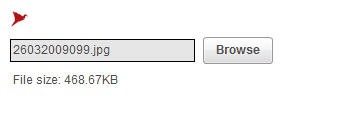
This is what the uploader looks like, I tried keeping it A.S.A.P (as simple as possible )
Waiting for your comments.